Python+OpenCV:基于KNN手写数据OCR(OCR of Hand-written Data using kNN)
标签: Python OpenCV python opencv
Python+OpenCV:基于KNN手写数据OCR(OCR of Hand-written Data using kNN)
OCR of Hand-written Digits
####################################################################################################
# 基于KNN手写数据OCR(OCR of Hand-written Data using kNN)
def lmc_cv_knn_ocr():
    """
        函数功能: 基于KNN手写数据OCR(OCR of Hand-written Data using kNN).
    """

    # 读取图像
    image = lmc_cv.imread('D:/99-Research/TestData/image/digits.png')
    gray_image = lmc_cv.cvtColor(image, lmc_cv.COLOR_BGR2GRAY)

    # Now we split the image to 2500 cells, each 20x20 size
    cells = [np.hsplit(row, 50) for row in np.vsplit(gray_image, 50)]

    # Make it into a Numpy array: its size will be (50,50,20,20)
    x = np.array(cells)

    # Now we prepare the training data and test data
    train = x[:, :25].reshape(-1, 400).astype(np.float32)  # Size = (1250,400)
    test = x[:, 25:50].reshape(-1, 400).astype(np.float32)  # Size = (1250,400)

    # Create labels for train and test data
    k = np.arange(10)
    train_labels = np.repeat(k, 125)[:, np.newaxis]
    test_labels = train_labels.copy()

    # Initiate kNN, train it on the training data, then test it with the test data with k=1
    knn = lmc_cv.ml.KNearest_create()
    knn.train(train, lmc_cv.ml.ROW_SAMPLE, train_labels)
    ret, result, neighbours, dist = knn.findNearest(test, k=5)

    # Now we check the accuracy of classification.
    # For that, compare the result with test_labels and check which are wrong.
    matches = result == test_labels
    correct = np.count_nonzero(matches)
    accuracy = correct * 100.0 / result.size
    print("accuracy:  {}\n".format(accuracy))

    # Instead of finding this training data every time I start the application, I better save it.
    # so that the next time, I can directly read this data from a file and start classification.
    # Save the data
    np.savez('knn_data.npz', train=train, train_labels=train_labels)

    # Now load the data
    with np.load('knn_data.npz') as data:
        print("data.files:  {}\n".format(data.files))
        train = data['train']
        train_labels = data['train_labels']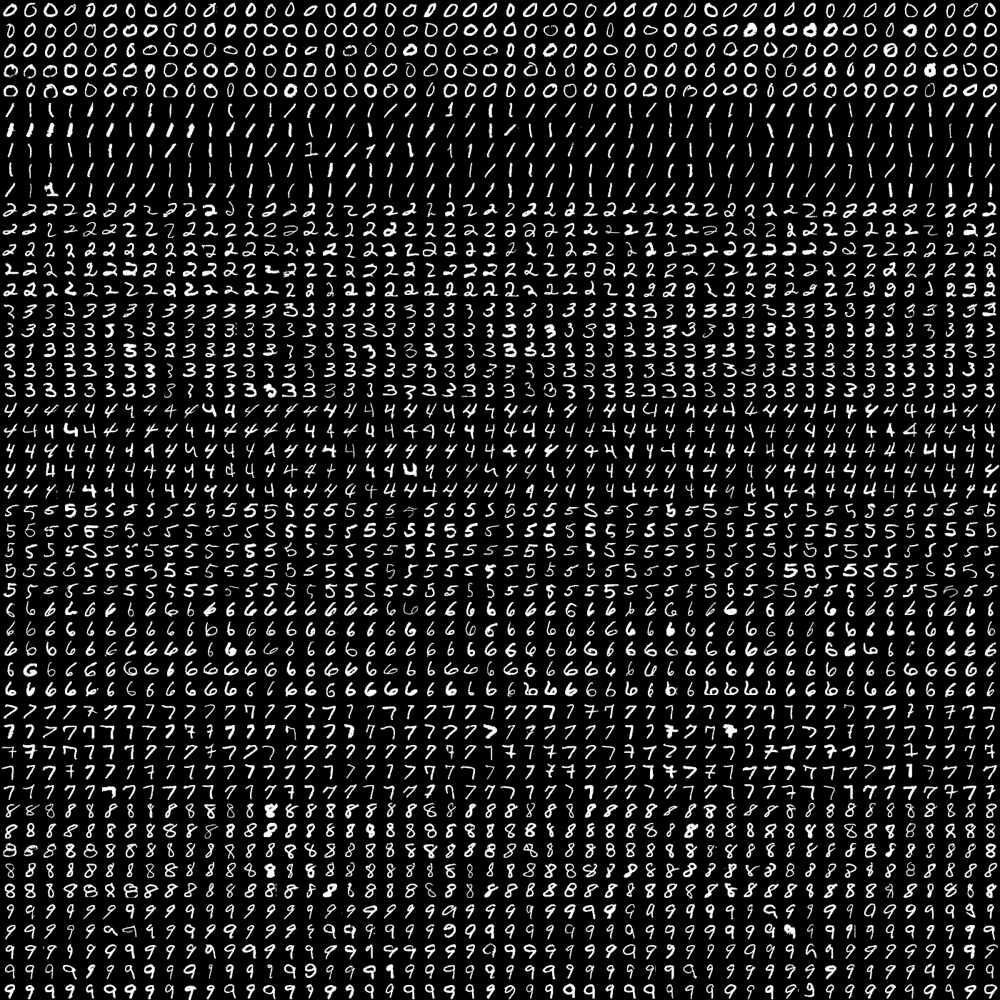
【结果】
accuracy:  88.72
data.files:  ['train', 'train_labels']
OCR of the English Alphabet
####################################################################################################
# 基于KNN英文字母OCR(OCR of English Alphabet Data using kNN)
def lmc_cv_knn_ocr_english_alphabet():
    """
        函数功能: 基于KNN英文字母OCR(OCR of English Alphabet Data using kNN).
    """

    # Load the data and convert the letters to numbers
    data = np.loadtxt('D:/99-Research/TestData/image/letter-recognition.data', dtype='float32', delimiter=',',
                      converters={0: lambda ch: ord(ch) - ord('A')})

    # Split the dataset in two, with 10000 samples each for training and test sets
    train, test = np.vsplit(data, 2)

    # Split trainData and testData into features and responses
    responses, train_data = np.hsplit(train, [1])
    labels, test_data = np.hsplit(test, [1])

    # Initiate the kNN, classify, measure accuracy
    knn = lmc_cv.ml.KNearest_create()
    knn.train(train_data, lmc_cv.ml.ROW_SAMPLE, responses)
    ret, result, neighbours, dist = knn.findNearest(test_data, k=5)
    correct = np.count_nonzero(result == labels)
    accuracy = correct * 100.0 / 10000
    print("accuracy:  {}\n".format(accuracy))
【结果】
accuracy: 93.06
智能推荐

How to Handle Missing Data with Python and KNN
在python中使用KNN算法处理缺失的数据 处理缺失的数据并不是一件容易的事。 方法的范围从简单的均值插补和观察值的完全删除到像MICE这样的更高级的技术。 解决问题的挑战性是选择使用哪种方法。 今天,我们将探索一种简单但高效的填补缺失数据的方法-KNN算法。 KNN代表“ K最近邻居”,这是一种简单算法,可根据定义的最接近邻居数进行预测。 它计算从您要分类的实例到训练集...

Data Exploration using Pandas pandas库 数据读取&清洗
原文章:pandas速查手册 英文文章:pandas cheat sheet 如果你想学习Pandas,建议先看两个网站。 pandas官方github:pandas-dev (1)官网:Python Data Analysis Library (2)十分钟入门Pandas:10 Minutes to pandas 在第一次学习Pandas的过程中,你会发现你需要记忆很多的函数和方法。所以在这里我...

Example of using Turtle
1、Turtle Methods Turtle motion method function Move and draw forward(distance) | fd(distance) 向前移动指定的距离,方向为当前海龟的朝向 backward(distance) | bk(distance) | back(distance) 向后移动指定的距离,与海龟当前的朝向相反,并且不改变海龟的朝向 ri...

MXNet官方文档中文版教程(7):手写数字识别(Handwritten Digit Recognition)
在本教程中,我们将逐步介绍如何使用MNIST 数据集构建手写数字分类器。 对于深度学习新手来说,这个练习可以说是和“Hello World”等同的。 MNIST 是广泛使用的用于手写数字分类任务的数据集。它由70,000个有标记的,28x28分辨率的手写数字图像组成。数据集分为6万个训练图像和10,000个测试图像。共有10个类别(10个数字每个一类)。目前的任务是使用60...
猜你喜欢

100 Days Of ML Code:Day 7/11-KNN
100天机器学习挑战汇总文章链接在这儿。 目录 Step1:数据预处理 Step2:将KNN应用于训练集 Step3:预测 Step1:数据预处理 因为用的是同一个数据集,这一步与Day6逻辑回归做的完全一致。 Step2:将KNN应用于训练集 KNeighborsClassifier的指导页面在这儿。 标答中对KNN分类器的设定是: 这两个parameters的含义是: p : int...
iOS学习笔记-103.多线程02——线程状态、同步、通信
多线程02线程状态同步通信 一线程状态 1 线程的状态 2 控制线程状态 二多线程安全 1 多线程的安全隐患 2 安全隐患分析 3 安全隐患解决互斥锁 三原子和非原子属性 四原子和非原子属性的选择 五线程间通信 1 什么叫做线程间通信 2 线程间通信的体现 3 线程间通信常用方法 多线程02——线程状态、同步、通信 一、线程状态 1.1 线程的状态 1.2 控制线程状态 启...

Python基础学习之路(六) ------ 函数/异常处理
一.函数定义 二.参数 注意传参顺序,如果乱序传参可指定赋值 不定长参数 :是一个星号*加上参数名(需要注意的是:默认参数必须放在位置参数之后。) 3.返回值 返回多个值(返回类型是元组) 另外一种方式:我们也可以同时定义多个变量,来接收元组中的多个元素 变量作用域 : 常见错误 : 4. try except 关于Python的所有报错类型,有需要的话可以在这里查阅:https://www.ru...
【7】Qt添加资源文件,为QAction添加图标
效果图 注意: 1)添加Icon地址格式 “:Qt Resource Editer添加目录" 2)本篇博客仅仅在博客【6】基础上添加下面两句 代码段: ...
从环形链表来看约瑟夫环的问题
首先如果不了解链表这种数据结构的 可以看下 https://blog.csdn.net/weixin_32770485/article/details/102468630 其实环形链表就是 链表的尾节点的next指针指向头节点,就跟贪吃蛇咬到自己尾巴这种造型是的 有点不形象 反正就是这个意思,老铁们。 咱们想想奥 如果这链表有环了,如果我们想遍历链表 不就是完蛋了吗,就会一直死循环啊。一圈圈的。 ...
